Marketplace Feedback — Leave, Reply, and Optional Auto-Post
We’re testing marketplace feedback in Brick Order Picker. It’s meant to keep BrickLink and BrickOwl feedback in one place with your orders — leave ratings, reply to buyers, and optionally post Positive feedback for you. It’s new, so we want real-world use and honest notes on what feels right or wrong.
What’s in Feedback
You’ll see a Feedback item in the nav. That page lists feedback you’ve given and received (as far as each marketplace allows).
- All — everything synced so far
- No reply yet — BrickLink notes from buyers you haven’t replied to
You can search by comment, buyer, or order id, and filter by rating (Positive / Neutral / Negative) or source (BrickLink / BrickOwl). Click an order id to jump straight to that order when we have it locally.
On each order
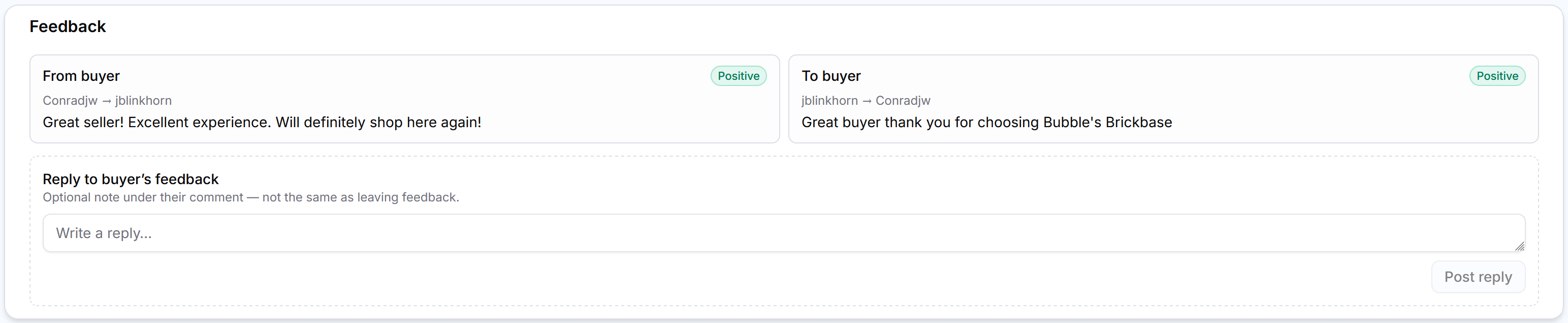
Open an order and look for the Feedback card. From there you can:
- See what the buyer said (From buyer) and what you left (To buyer)
- Leave feedback for the buyer — pick a rating and comment (saved templates from Settings show up here too)
- Reply on BrickLink when someone leaves you feedback (a short note under theirs)
If something fails when leaving or auto-posting, the card shows the error and a way to retry.
Optional auto-feedback
Under Settings → Feedback, auto-feedback is off by default. Turn it on only if you want the app to leave Positive feedback for you.
You choose:
- When — when the order is shipped, or (BrickLink) after the buyer leaves feedback first
- Where — BrickLink, BrickOwl, or both
- What to say — a list of comment templates; each post picks one at random. You can use
{buyer}and{orderId}so the message feels personal. Comments are capped at 80 characters (marketplace limit)
It only covers orders that move into an eligible status after you turn it on — it won’t suddenly blast your whole history. Keep an eye on a few orders the first time you enable it.
BrickOwl vs BrickLink
BrickLink is the fuller experience: we sync given and received feedback, and you can reply.
BrickOwl lets you leave feedback from the app, but their API doesn’t let us pull feedback buyers left for you. So BrickOwl “from buyer” won’t show up in the Feedback page the way BrickLink does. Auto-feedback on BrickOwl runs when the order is shipped (we can’t wait for buyer feedback we can’t see).
What we’d love to hear
This is a test run. If you try it, tell us:
- Is the Feedback page useful day to day, or do you mostly live on the order card?
- Does auto-feedback timing and wording match how you actually sell?
- Anything confusing, missing, or scary (especially around auto-post)?
- BrickOwl gaps — what would help most while we can’t import received feedback?
Best way to reach me is through the app or the Facebook page. Thanks for trying it — and for using Brick Order Picker.